1. 系统环境
Hardware Environment(Ascend/GPU/CPU):  GPU
Software Environment:
MindSpore version (source or binary): 1.6.0
Python version (e.g., Python 3.7.5): 3.7.6
OS platform and distribution (e.g., Linux Ubuntu 16.04): Ubuntu
GCC/Compiler version (if compiled from source):
2. 问题描述
训练脚本是通过图模式测试Tensor的初始化,并使用了JIT(just in time) Fallback特性。脚本如下:
01 class Net(nn.Cell):
02   def __init__(self):
03        super(Net, self).__init__()
04        self.bias_add = ops.BiasAdd(data_format="NCHW")
05        data = np.random.random(3).reshape((3,1))
06   def construct(self, x):
07        y = Tensor(self.data, mindspore.float32)
08        x = self.bias_add(x,y)
09        return x
10
11 x = Tensor(np.arange(6).reshape((2,3)), mindspore.float32)
12 net = Net()
13 out = net(x)
14 print("out:", out.shape)
15 print(out)
-
报错
报错信息如下:[ERROR] ME(52672:139874759677760,MainProcess):2022-01-13-16:08:13.907.399 [mindspore/_extends/parse/parser.py:565] When eval ‘Tensor(self.data, mindspore.float32)’ by using Fallback feature, an error occurred: data. You can try to turn off the Fallback feature by ‘export MS_DEV_ENABLE_FALLBACK=0’.
[ERROR] ANALYZER(52672,7f37215d1740,python):2022-01-13-16:08:13.908.581 [mindspore/ccsrc/pipeline/jit/static_analysis/async_eval_result.cc:66] HandleException] Exception happened, check the information as below.
The function call stack (See file ‘/opt/sdc/l00476171/proj/turtorial/rank_0/om/analyze_fail.dat’ for more details):
# 0 In file test_biasAdd.py(23)
y = Tensor(self.data, mindspore.float32)
^
Traceback (most recent call last):
File "test_biasAdd.py", line 31, in <module>
out = net(x)
…
NameError: data
3. 原因分析
在MindSpore r1.5及以前的版本,静态图模式不支持静态图的常量场景,即不支持在construct中创建和使用Tensor。而在脚本中第7行代码发现了在construct中创建tensor对象并使用。
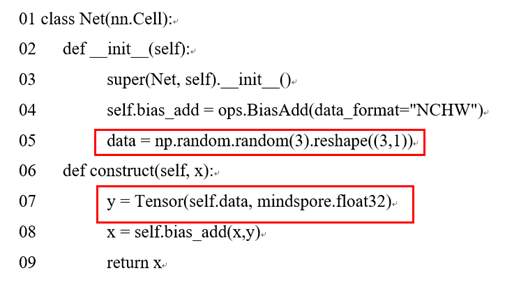
看报错信息:When eval ‘Tensor(self.data, mindspore.float32)’ by using Fallback feature。从官网找到Fallback feature可以在construct中创建常量tensor对象,此时init方法中初始化的data就是常量,可以确认不是Fallback feature引起的报错。
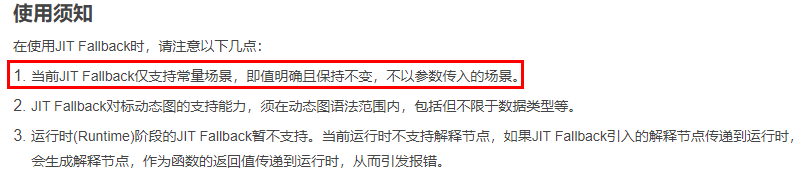
继续看报错信息:an error occurred: data。data是定义的网络属性参数,检查代码对比代码行05和07,发现原来是data变量定义存在问题。05行代码中初始定义的是data, 表示一个临时的局部变量,不是Net的属性参数, 在07行获取self.data时, 此时self.data没有定义所以引起了报错。
4. 解决方法
基于上述报错原因,很容易做出如下修改:
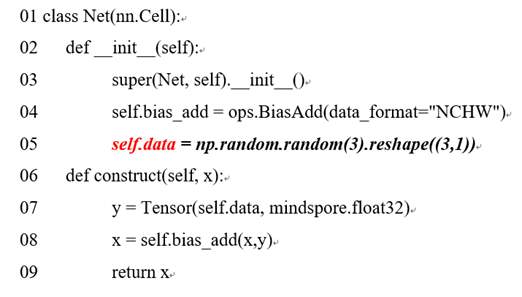
此时执行成功,输出如下:
[WARNING] PIPELINE(49927,7fc3d7296740,python):2022-01-13-18:01:54.153.611 [mindspore/ccsrc/pipeline/jit/pipeline.cc:1171] CheckInterpretNodeLineInfos] Found unsupported syntax in Graph mode, those codes would be fallen back to Python interpreter:
        #1: In file test_biasAdd.py(23)
        y = Tensor(self.data, mindspore.float32)
            ^
out: (2, 3)
[[0.0907748 1.1973865 2.1838439]
 [3.0907748 4.1973867 5.1838436]]
由输出日志信息看出,需要使用JIT Fallback特性来支持的语句,会打印了提示信息和对应代码行:

5. 总结
定位报错问题的一般流程是: 1、首先找到报错的用户代码行: y = Tensor(self.data, mindspore.float32) 2、然后根据日志报错信息中的关键字,缩小分析问题的范围:Fallback feature 3、报错信息需要Traceback中的报错信息:NameError: data。