在Altas 200I DK A2开发版安装Mindspore Ascend版本时报错

在Altas 200I DK A2开发版上配置Ascend版本的Mindspore环境。
使用烧录软件烧录了下图的固件和驱动。
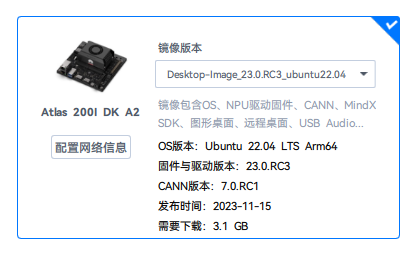
查找资料显示上述固件和驱动支持Mindspore版本2.2.0。
在安装并配置完环境后,测试环境时会出现如下报错:
(mindspore_ascend) HwHiAiUser@davinci-mini:~$ python
Python 3.9.25 (main, Nov 3 2025, 22:33:42)
[GCC 11.2.0] :: Anaconda, Inc. on linux
Type “help”, “copyright”, “credits” or “license” for more information.

import numpy as np
import mindspore as ms
/home/HwHiAiUser/.conda/envs/mindspore_ascend/lib/python3.9/site-packages/numpy/core/getlimits.py:549: UserWarning: The value of the smallest subnormal for <class ‘numpy.float64’> type is zero.
setattr(self, word, getattr(machar, word).flat[0])
/home/HwHiAiUser/.conda/envs/mindspore_ascend/lib/python3.9/site-packages/numpy/core/getlimits.py:549: UserWarning: The value of the smallest subnormal for <class ‘numpy.float32’> type is zero.
setattr(self, word, getattr(machar, word).flat[0])
from mindspore import ops

ms.set_context(mode=ms.PYNATIVE_MODE, device_target=“Ascend”)
x = ms.Tensor(np.ones([1,3,3,4]).astype(np.float32))
y = ms.Tensor(np.ones([1,3,3,4]).astype(np.float32))
z = ops.add(x, y)
print(z)

Traceback (most recent call last):
File “”, line 1, in
File "/home/HwHiAiUser/.conda/envs/mindspore_ascend/lib/python3.9/site-packages/mindspore/common/stub_tensor.py", line 49, in fun
return method(*arg, **kwargs)
File “/home/HwHiAiUser/.conda/envs/mindspore_ascend/lib/python3.9/site-packages/mindspore/common/tensor.py”, line 493, in str
return str(self.asnumpy())
File “/home/HwHiAiUser/.conda/envs/mindspore_ascend/lib/python3.9/site-packages/mindspore/common/tensor.py”, line 964, in asnumpy
return Tensor
.asnumpy(self)
RuntimeError: The device address type is wrong: type name in address:CPU, type name in context:Ascend


  • C++ Call Stack: (For framework developers)

mindspore/ccsrc/plugin/device/ascend/hal/hardware/ge_device_res_manager.cc:72 AllocateMemory

经过尝试在使用了ops运算符后,对z无法执行.asnumpy()函数。
上述错误是由于驱动和mindspore版本不匹配导致的吗?还是说Ascend相关配置不正确。

使用npu-smi info命令可以看到npu硬件
(mindspore_ascend) HwHiAiUser@davinci-mini:~$ npu-smi info
±-------------------------------------------------------------------------------------------------------+
| npu-smi 23.0.rc3 Version: 23.0.rc3 |
±------------------------------±----------------±-----------------------------------------------------+
| NPU Name | Health | Power(W) Temp(C) Hugepages-Usage(page) |
| Chip Device | Bus-Id | AICore(%) Memory-Usage(MB) |
+===============================+=================+======================================================+
| 0 310B4 | Alarm | 7.4 50 15 / 15 |
| 0 0 | NA | 0 3294 / 3513 |
+===============================+=================+======================================================+

答案内容由AI生成,仅供参考:

:white_check_mark: 总结与建议

项目 当前情况 建议
NPU 状态 正常(npu-smi 可见) :white_check_mark: 无需更换驱动
MindSpore 安装 包含 Ascend 支持(set_context 成功) :red_exclamation_mark:需验证版本是否为 2.2.0
Tensor 分配问题 数据未正确搬至 Ascend :white_check_mark: 使用 .to("Ascend") 显式迁移
环境变量 未提及 :white_check_mark: 必须执行 source /usr/local/Ascend/ascend-toolkit/set_env.sh
版本匹配 CANN 7.0.RC1 + MindSpore ? :red_exclamation_mark:建议安装 MindSpore 2.2.0 或 2.3.1
点击此处查看详细分析解答

错误分析:RuntimeError: The device address type is wrong: type name in address:CPU, type name in context:Ascend

您在 Atlas 200I DK A2 开发板上安装了昇腾(Ascend)相关固件和 MindSpore 框架,但在运行测试代码时遇到如下错误:

RuntimeError: The device address type is wrong: type name in address:CPU, type name in context:Ascend

该错误并非由驱动不匹配直接导致,而是表明 MindSpore 成功识别并初始化了 Ascend 硬件环境,但在执行张量操作后,数据地址仍驻留在 CPU 上,与当前上下文要求的 Ascend 设备不一致


:magnifying_glass_tilted_left: 问题定位分析

我们结合您提供的 系统配置信息错误日志知识库内容 进行综合判断。

:pushpin: 1. 系统环境配置正确性

根据您上传的截图:

  • 开发板型号:Atlas 200I DK A2 :white_check_mark:
  • 操作系统:Ubuntu 22.04 LTS Arm64 :white_check_mark:
  • NPU 驱动版本:23.0.RC3 :white_check_mark:
  • CANN 版本:7.0.RC1 :white_check_mark:
  • 固件支持 MindSpore 2.2.0 :white_check_mark:

同时使用 npu-smi info 命令可正常查看 NPU 设备信息,说明:

:white_check_mark: NPU 驱动已正确安装并运行,设备物理上可通信


:pushpin: 2. MindSpore 安装与执行上下文配置

您执行了以下代码:

ms.set_context(mode=ms.PYNATIVE_MODE, device_target="Ascend")

:white_check_mark: set_context 调用未报错,意味着:

  • MindSpore 已成功加载 Ascend 后端支持库(如 libmindspore_ascend.so
  • 当前安装的 MindSpore 版本包含 Ascend 支持(即安装包为 Ascend 版本)

:warning: 但后续报错 “device address type is wrong: CPU vs Ascend” 表示:

Tensor 的数据实际存放在 CPU 内存中,而不是 Ascend 设备内存中,而上下文期望操作发生在 Ascend 上。


:puzzle_piece: 根本原因分析

这个错误的核心是:Tensor 未正确搬运至 Ascend 设备

尽管设置了 device_target="Ascend",但如果 Tensor 是通过 NumPy 创建并直接构建为 MindSpore Tensor,它们默认位于 Host(CPU)内存中不会自动传输到 NPU 设备

只有当执行了显式或隐式的 设备内存分配操作(如算子执行、to() 方法等) 时,MindSpore 才会尝试将 Tensor 搬运到目标设备。

而您的测试流程中存在一个关键问题:

x = ms.Tensor(np.ones([1,3,3,4]).astype(np.float32))
y = ms.Tensor(np.ones([1,3,3,4]).astype(np.float32))
z = ops.add(x, y)  # 此处 add 是 Python 层级封装,可能仍未触发设备搬运
print(z)            # 触发 asnumpy() 报错

ops.add(x, y) 在 PyNative 模式下,若 x 和 y 未显式部署到 Ascend,可能会延后设备分配或失败搬运

更关键的是:调用 .asnumpy() 要求 Tensor 数据位于可访问的 Host 内存中。但如果 Tensor 被错误地标记为“在 Ascend”,但底层内存未被成功分配或同步,则会抛出地址类型冲突的错误。


:white_check_mark: 解决方案

:white_check_mark: 方案 1:显式将 Tensor 移动到 Ascend 设备

使用 .to(device)ms.Tensor(..., device="Ascend") 显式创建位于 Ascend 上的 Tensor:

import numpy as np
import mindspore as ms
from mindspore import ops, Tensor

# 设置上下文
ms.set_context(mode=ms.PYNATIVE_MODE, device_target="Ascend")

# 方法一:创建时指定设备
x = Tensor(np.ones([1,3,3,4]), dtype=ms.float32).to("Ascend")
y = Tensor(np.ones([1,3,3,4]), dtype=ms.float32).to("Ascend")

# 或方法二:使用 Tensor 构造函数 + device 参数(MindSpore 2.0+ 支持)
# x = ms.Tensor(np.ones([1,3,3,4]), ms.float32, device="Ascend")

z = ops.add(x, y)
print(z.asnumpy())  # 现在可以安全地拷贝回 CPU 并打印

:white_check_mark: 方案 2:检查 MindSpore 与 CANN/CUDA 类工具包版本兼容性

虽然 set_context 成功,但仍有潜在版本不兼容风险:

组件 当前版本 推荐组合
CANN 7.0.RC1 :check_mark: 支持 MindSpore 2.2.0
MindSpore 应为 2.2.0 :red_exclamation_mark:请确认实际安装版本

:pushpin: 请验证是否真的安装了与 CANN 7.0 兼容的 MindSpore 版本

python -c "import mindspore; print(mindspore.__version__)"

:warning: 若安装的是 高于 2.2.0 的版本(如 2.6.0)且 CANN 未升级,可能出现兼容性问题。

根据知识库:

  • MindSpore 2.6.0 需要 CANN 8.x(如 8.1.RC1)支持
  • 使用 CANN 7.0 时建议搭配 MindSpore 2.2.x 或 2.3.1

:backhand_index_pointing_right: 解决方案

# 卸载当前版本
pip uninstall mindspore

# 安装适配 CANN 7.0 的 MindSpore 版本(Ascend 版)
pip install https://ms-release.obs.cn-north-4.myhuaweicloud.com/2.2.0/MindSpore/unified/aarch64/mindspore-2.2.0-cp39-cp39-linux_aarch64.whl

:globe_with_meridians: 下载地址:https://www.mindspore.cn/install → 选择 “源码编译” 或 “aarch64” 架构 Ascend 包


:white_check_mark: 方案 3:确保环境变量正确设置(关键!)

即使安装了 Ascend 版本 MindSpore,也必须配置 Ascend 工具链环境变量:

source /usr/local/Ascend/ascend-toolkit/set_env.sh

该脚本设置以下变量:

  • LD_LIBRARY_PATH:确保能找到 libge.so, libruntime.so 等 CANN 库
  • PYTHONPATH:让 Python 找到 te, topi, hccl 等算子库

:warning: 若未设置,可能导致运行时无法加载算子 → Tensor 分配失败或停留在 CPU


:white_check_mark: 方案 4:避免使用过旧或 RC 版本组合

您的 CANN 和固件为 23.0.RC37.0.RC1,属于预发布版本,可能存在稳定性问题。

强烈建议升级为正式版本(如 CANN 7.0.RC1 后的稳定版 7.0.X),或统一使用较新的稳定组合(如 CANN 8.1 + MindSpore 2.6/2.7)


:white_check_mark: 总结与建议

项目 当前情况 建议
NPU 状态 正常(npu-smi 可见) :white_check_mark: 无需更换驱动
MindSpore 安装 包含 Ascend 支持(set_context 成功) :red_exclamation_mark:需验证版本是否为 2.2.0
Tensor 分配问题 数据未正确搬至 Ascend :white_check_mark: 使用 .to("Ascend") 显式迁移
环境变量 未提及 :white_check_mark: 必须执行 source /usr/local/Ascend/ascend-toolkit/set_env.sh
版本匹配 CANN 7.0.RC1 + MindSpore ? :red_exclamation_mark:建议安装 MindSpore 2.2.0 或 2.3.1

:white_check_mark: 推荐最终测试代码

import numpy as np
import mindspore as ms
from mindspore import Tensor, ops

ms.set_context(mode=ms.PYNATIVE_MODE, device_target="Ascend")

# 显式创建在 Ascend 上的 Tensor
data = np.random.rand(2, 2).astype(np.float32)
x = Tensor(data).to("Ascend")
y = Tensor(data).to("Ascend")

z = ops.add(x, y)
print("Result shape:", z.shape)
print("Result value:\n", z.asnumpy())  # 正确执行

:books: 参考资料

  • MindSpore 安装指南
  • CANN 与 MindSpore 版本兼容对照表(见官网文档 → “版本配套关系”)
  • Atlas 200I DK A2 用户手册(Huawei 官网)

如有其他报错,请提供 mindspore.__version__ 及完整日志以便进一步诊断。

上述方法成功在Ascend侧创建了x,y,z,但是使用.asnumpy()时还是有报错信息:
(mindspore_ascend) HwHiAiUser@davinci-mini:~$ python
Python 3.9.25 (main, Nov 3 2025, 22:33:42)
[GCC 11.2.0] :: Anaconda, Inc. on linux
Type “help”, “copyright”, “credits” or “license” for more information.

import numpy as np
import mindspore as ms
/home/HwHiAiUser/.conda/envs/mindspore_ascend/lib/python3.9/site-packages/numpy/core/getlimits.py:549: UserWarning: The value of the smallest subnormal for <class ‘numpy.float64’> type is zero.
setattr(self, word, getattr(machar, word).flat[0])
/home/HwHiAiUser/.conda/envs/mindspore_ascend/lib/python3.9/site-packages/numpy/core/getlimits.py:549: UserWarning: The value of the smallest subnormal for <class ‘numpy.float32’> type is zero.
setattr(self, word, getattr(machar, word).flat[0])
from mindspore import ops, Tensor

ms.set_context(mode=ms.PYNATIVE_MODE, device_target=“Ascend”)
data = np.random.rand(2,2).astype(np.float32)
x = Tensor(data).to(“Ascend”)
y = Tensor(data).to(“Ascend”)
z = ops.add(x, y)

print(type(x))
<class ‘mindspore.common._stub_tensor.StubTensor’>
print(type(z))
<class ‘mindspore.common._stub_tensor.StubTensor’>
print(z.asnumpy())
Traceback (most recent call last):
File “”, line 1, in
File “/home/HwHiAiUser/.conda/envs/mindspore_ascend/lib/python3.9/site-packages/mindspore/common/_stub_tensor.py”, line 48, in fun
arg = (stub.stub_sync(),) + arg[1:]
File “/home/HwHiAiUser/.conda/envs/mindspore_ascend/lib/python3.9/site-packages/mindspore/common/_stub_tensor.py”, line 153, in stub_sync
val = self.stub.get_value()
TypeError: Invalid dtype


  • C++ Call Stack: (For framework developers)

mindspore/core/ops/cast.cc:65 InferType

用户您好,欢迎安装使用MindSpore。已收到上述问题,会尽快分析答复~

用户您好,请问是使用的whl还是tar包呢,还请补充一下日志信息,方便分析问题。可通过如下设置获取日志。

export GLOG_v=1

@SanEryi 用户您好,由于较长时间未看到您回复信息,这里版主将进行采纳回答的结帖操作,如果还其他疑问请发新帖子提问,谢谢支持~

此话题已在最后回复的 60 分钟后被自动关闭。不再允许新回复。